

The EVG (Emirates Vehicle Gate) is the UAE’s unified federal platform for vehicle services. To perform an EVG fine check, visit the official portal and use the ‘Pay Traffic Fines’ service. You can inquire using your Traffic Code Number (TCN), plate number, or license number to view and pay all outstanding fines.
Your Next Steps
- Check Now: Have your TCN, license, or plate number ready for the inquiry.
- Log In: Use your UAE Pass for secure access to all your linked vehicle services.
- Review Fines: Check the violation date, amount in AED, and any black points.
What is the Emirates Vehicle Gate (EVG)?
The Emirates Vehicle Gate, known as EVG, is the official e-service platform from the UAE government. It connects federal and local traffic and licensing systems into one single portal for easier management.
More than just a fine portal
While it is most famous for the EVG traffic fines inquiry service, the platform is much more comprehensive. It is designed to handle vehicle registration renewals, insurance details, accident history, and other critical vehicle services.
Who can use the EVG system?
The system is designed for all UAE residents, citizens, and companies. It covers vehicles registered in all emirates, including Dubai, Abu Dhabi, and Sharjah, making it a true one-stop shop for managing your vehicles and driving file.
How to Perform an EVG Fine Check? (Step-by-Step)
The EVG portal offers several ways to check for fines. You can use the public inquiry service or log in with UAE Pass. Logging in is recommended as it automatically shows all fines linked to your profile.
Here are the primary methods to check your fines.
Method 1: Check fines using your Traffic Code Number (TCN)
Step 1: Access the service
Navigate to the official EVG website. From the main dashboard, select the “Pay Traffic Fines” service.
Step 2: Select your search criteria
Choose the option to search by “Traffic Code Number” (TCN). Your TCN is a unique identifier found on your vehicle registration card (Mulkiya).
Step 3: Enter the TCN
Input your TCN and complete the captcha or verification step.
Step 4: View your fines
The system will display all EVG fines associated with your traffic file, including amounts in AED and any black points.
Method 2: Check fines using your vehicle plate number
Step 1: Choose the plate number option
On the fine inquiry page, select the “Search by Plate Number” tab.
Step 2: Provide vehicle details
You must enter your full plate number. You also need to select the issuing emirate (e.g., Dubai), and the plate color and type (e.g., Private, Commercial).
Step 3: Review the results
All outstanding fines for that specific vehicle will be shown. This method is useful if you are checking a single car or a car you do not own.
Method 3: Check fines using your license number
Step 1: Select the license option
Choose “Search by License Number” from the service menu options.
Step 2: Enter your details
Input your UAE driving license number and select the issuing authority (e.g., Dubai RTA, Abu Dhabi Police).
Step 3: See your personal fines
This method shows fines linked directly to your driving license, which may include violations where you were the identified driver, regardless of the car.

Understanding Your EVG Fine Details
When you complete your EVG traffic fine check, the portal will show several key details. It is important to understand what they mean.
- Violation: This describes the offense, such as “Exceeding maximum speed limit” or “Using a phone while driving.”
- Date and Time: This shows exactly when the violation was recorded by the camera or officer.
- Amount (AED): This is the total penalty you are required to pay in Emirati Dirhams.
- Black Points: This shows how many black points, if any, will be added to your license for this specific violation.
How to Pay Your EVG Traffic Fines?
Once you have reviewed your fines, the portal makes payment straightforward.
Online payment process
After viewing your list of fines, you can select which ones to pay. You have the option to pay all fines at once or select specific violations individually.
Click the “Pay” or “Proceed to Payment” button. The EVG system accepts major credit and debit cards (such as Visa and Mastercard). After a successful payment, your traffic file is typically updated instantly.
Paying fines in installments
For drivers with large fine amounts, some emirates offer interest-free installment plans. This service is often facilitated through specific UAE banks (e.g., ADCB, ENBD).
You must check the EVG portal or your emirate’s local police website (like Dubai Police or Abu Dhabi Police) to see if your bank participates and if your total fine amount qualifies for an installment plan.
Are there discounts on traffic fines?
Yes, but they are not permanent. Individual emirates (like Sharjah, Ajman, or UAQ) often announce traffic fine discount schemes, usually around national holidays or special occasions.
These discounts are time-sensitive and may cover only certain types of violations. Always check the official “News” section of the EVG or local police apps for current announcements.
Other Ways to Check UAE Traffic Fines
While EVG is the comprehensive federal portal, you can also use emirate-specific platforms, which may offer different features like detailed violation photos.
| Platform | Scope | Best For… | Payment Accepted |
| Emirates Vehicle Gate (EVG) | All UAE (Federal) | Checking all fines from all emirates in one place. | Yes |
| MOI UAE App | All UAE (Federal) | Mobile-first users who want a federal-level check. | Yes |
| Dubai Police App / Website | Dubai Only | Checking Dubai-specific fines, viewing violation photos. | Yes |
| Abu Dhabi Police App / Website | Abu Dhabi Only | Checking Abu Dhabi fines, accessing installment plans. | Yes |
| RTA Dubai Website / App | Dubai Only | Checking RTA-specific fines (e.g., Salik, parking). | Yes |
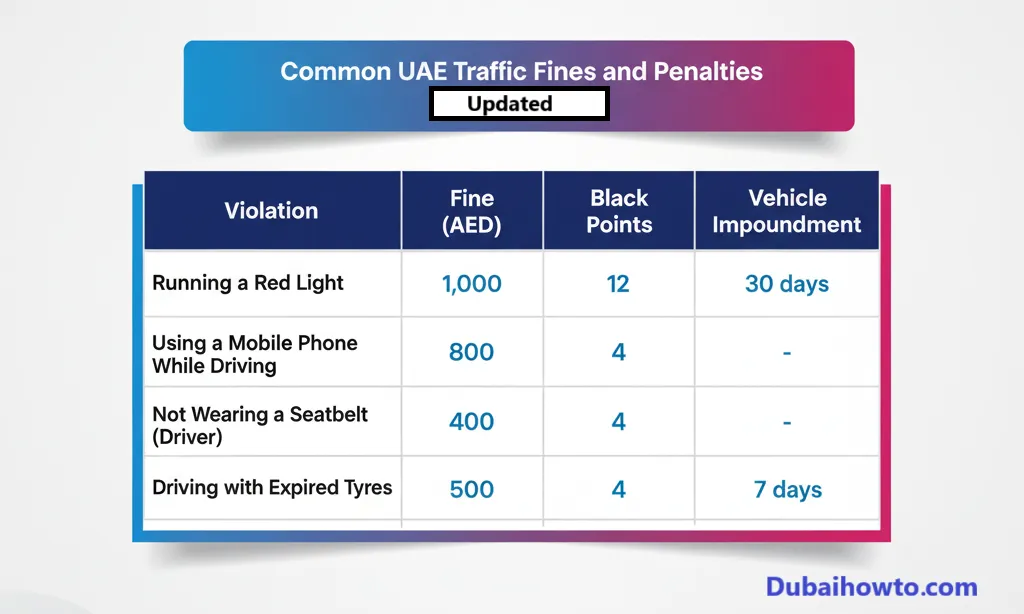
Common UAE Traffic Fines and Penalties (2026 Update)
Knowing the penalties can help you avoid them. Fines are set at the federal level and often include both an AED amount and black points, which can lead to license suspension.
Here are some of the most common violations as of 2026.
| Violation | Fine (AED) | Black Points | Vehicle Impoundment |
| Exceeding max speed limit by > 80 km/h | 3,000 | 23 | 60 days |
| Driving under the influence of alcohol | Decided by court | 24 | 60 days |
| Running a red light (light vehicle) | 1,000 | 12 | 30 days |
| Using a mobile phone while driving | 800 | 4 | – |
| Not wearing a seatbelt (driver) | 400 | 4 | – |
| Not wearing a seatbelt (any passenger) | 400 | – | – |
| Sudden swerving or lane deviation | 1,000 | 4 | – |
| Driving with expired tyres (per tyre) | 500 | 4 | 7 days |
| Driving with expired registration (Mulkiya) | 500 | 4 | 7 days |
| Illegal or improper parking | 500 | – | – |
Pro Tip: Set a calendar reminder to perform an EVG traffic fine check one week before your vehicle registration (Mulkiya) is due for renewal. You cannot renew your registration in any emirate if you have outstanding traffic fines from any other emirate.
Final Thoughts
Using the EVG fine check service is the most responsible and efficient way to manage your driving record in the UAE. The platform is fast, secure, and provides a comprehensive view of all your vehicle-related obligations.
By checking regularly, you avoid unexpected penalties, prevent black points from accumulating, and ensure you have a smooth and clear record for your annual vehicle registration renewal.
Frequently Asked Questions (FAQs)
What is the difference between EVG and MOI for fines?
The MOI (Ministry of Interior) app and the EVG portal are both federal systems. EVG is a web portal focused specifically on vehicle services (registration, insurance, fines). The MOI app is a broader mobile application covering many services, including fines, visa status, and police services.
How long does it take for a fine to appear on EVG?
It can take anywhere from 24 hours to 5 business days for a new traffic fine to be recorded and appear in the EVG system after the violation occurs. It is best to wait a few days before checking.
Can I check EVG fines with my Emirates ID?
You use your Emirates ID to log into your UAE Pass account, which then gives you secure, authenticated access to your EVG profile. To perform a public search for fines without logging in, you must use your TCN, plate number, or license number.
What does ‘TCN’ mean for EVG fines?
TCN stands for Traffic Code Number (it may also be called a Traffic File Number). It is a unique number assigned to every driver and vehicle owner in the UAE. You can find your TCN listed on your vehicle registration card (Mulkiya).
Last updated: October 2026
Reviewed by: UAE Driving Policy Team

Author: The DubaiHowto Editorial Team
DubaiHowto is an independent informational platform created to help UAE residents and visitors understand everyday services such as public transport, telecom, government procedures, visas, fines, and utility systems.
Our editorial team researches and verifies content using official UAE sources (including government portals, service providers, and regulatory authorities) and real on-ground experience of living in the UAE. Each guide is written to be practical, easy to understand, and regularly updated to reflect the latest rules, fees, and procedures.
We focus on clarity, accuracy, and usefulness — especially for people navigating UAE systems for the first time. Learn More about DubaiHowto.
Last reviewed: February 2026. Sources: Official UAE portals and service providers