
You can check your absconding status in the UAE primarily through the Ministry of Human Resources and Emiratisation (MoHRE) website or smart app. Use the “Enquiry Services” to view your labour card status, which will reflect any “Absence from Work” reports filed against you by your employer.
Your Immediate Steps
- Check Online: Use the MoHRE app or website to check your “Labour Card Information” or “Employment Contract” status.
- Call MoHRE: Dial the 24/7 helpline at 600590000 and ask the agent to check your status using your passport or Emirates ID number.
- Check for Fines: Use the ICP (all UAE) or GDRFA (Dubai) websites to check for any immigration fines or bans, which often result from an absconding case.
What is an Absconding Report in the UAE?
If you’re an employee in the UAE, it’s crucial to understand your legal standing. An “absconding” report, officially termed an “Absence from Work” report by the Ministry of Human Resources and Emiratisation (MoHRE), is a serious complaint an employer can file against you.
What ‘absconding’ means for employees?
An employer can file this report if you are absent from work for seven consecutive days without a valid reason or approved leave.
This isn’t just a mark on your company file; it’s a formal legal complaint lodged with MoHRE. It can lead to severe penalties, including employment bans and fines, making it vital to know your status.
Why you must check your status?
You may need to check your status if you:
- Left a job on bad terms and are unsure if the employer filed a report.
- Are applying for a new visa and want to ensure your record is clear.
- Had a dispute with your employer and stopped going to work.
Knowing your status allows you to take corrective action, if possible, rather than discovering the issue when you are applying for a new job or trying to leave the country.
How to Check Absconding Status in UAE (Employee Guide)
There are several ways to check if an absconding report has been filed against you. The most direct methods involve MoHRE, as they are the governing body for labour relations.
Method 1: Using the MoHRE Website or Smart App (Step-by-Step)
This is the fastest way to check your labour file. An absconding report will be registered against your labour card (work permit).
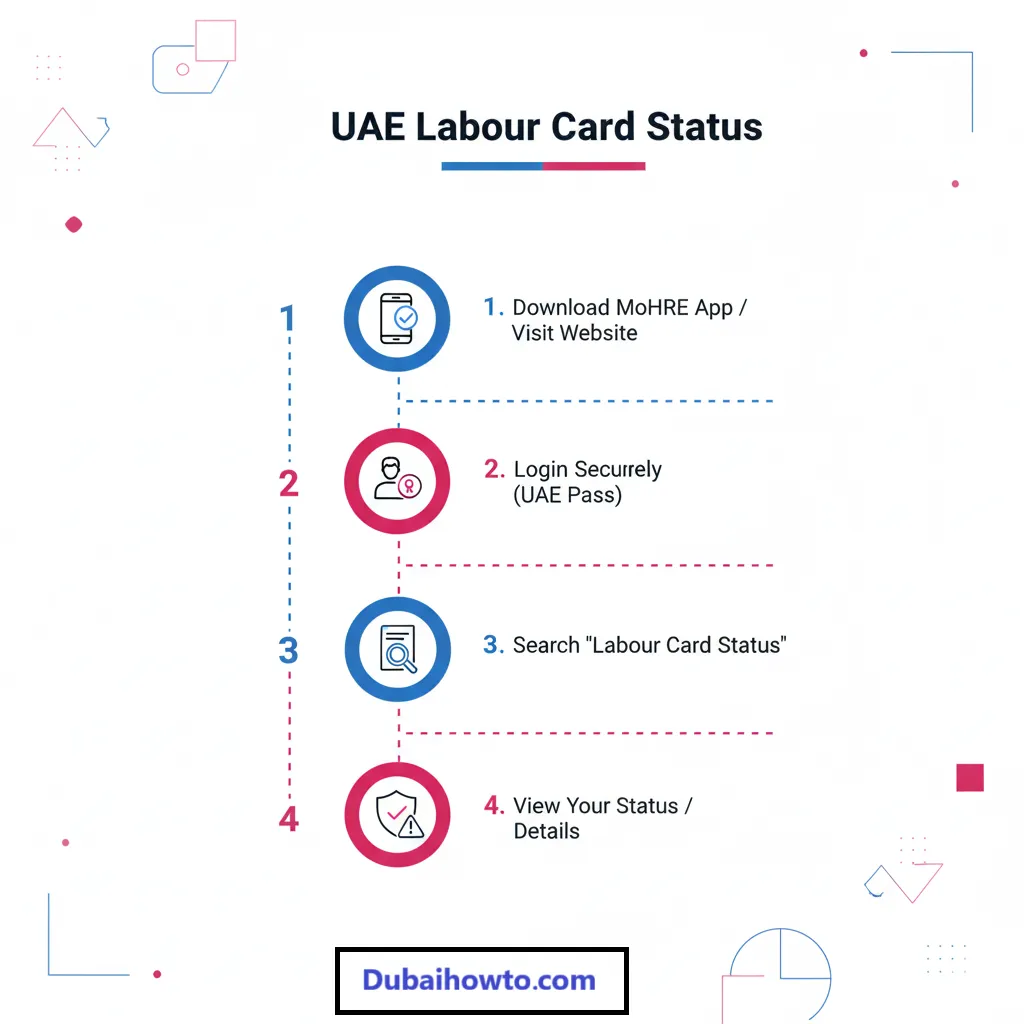
Step 1: Download the MoHRE smart app (available on iOS and Android) or visit the official MoHRE website.
Step 2: Log in using your UAE Pass for secure access. If you don’t have UAE Pass, you can use the “Enquiry Services” section.
Step 3: Navigate to the service for “View My Labour Card” or “My Contract.” You will typically need to enter your passport number, nationality, and date of birth.
Step 4: Review your employment details. If an absconding report has been filed and approved, your employment status will no longer show as “Active.” It may show a “Cancelled” status with an absconding note or an active “Absence from Work” complaint.
Method 2: Calling the MoHRE Helpline
For a direct and clear answer, you can contact the ministry’s call centre.
- Make the call: Dial the 24/7 MoHRE helpline at 600590000. You can also contact them via WhatsApp at the same number.
- Provide details: Have your passport number, Emirates ID number (if you have one), and your company’s name ready.
- Ask directly: Ask the representative, “I would like to check my labour status and see if there are any complaints, such as an absconding report, filed against me.”

Method 3: Checking for Fines or Bans (ICP & GDRFA)
An absconding report often leads to immigration penalties, such as fines and travel bans. Checking these systems is a good indirect way to see if any action has been taken against you.
For all Emirates (except Dubai visas):
- Step 1: Visit the ICP (Federal Authority for Identity, Citizenship, Customs and Port Security) smart services website.
- Step 2: Look for the “Fines and Violations” inquiry service.
- Step 3: Enter your Emirates ID number, unified number (UDB), or passport number to check for any outstanding visa-related fines.
For Dubai-issued visas:
- Step 1: Visit the GDRFA (General Directorate of Residency and Foreigners Affairs – Dubai) website.
- Step 2: Use the “Fines Inquiry Service” to check for any penalties linked to your residency file.
What to Do If You Have an Absconding Report?
Finding out you have an absconding case is stressful, but you may have options.
Can you challenge a false absconding report?
Yes. If you believe the report was filed maliciously or you have proof that you were not absconding (e.g., medical leave certificates, email communication, leave approvals), you can file a dispute.
You must contact MoHRE immediately to file a labour complaint. You can do this via the app, helpline, or by visiting a Tawjeeh or Tas’heel centre. You will need to provide all your evidence to prove the report is false.
Legal consequences of a confirmed report
If the report is confirmed and you are found to be at fault, the consequences are serious.
| Consequence | Description |
| Employment Ban | You will likely receive a one-year ban from working in the UAE. Your new work permit will be blocked. |
| Legal Status | Your visa and Emirates ID will be cancelled, making your presence in the country illegal. |
| Fines | You may face significant overstay fines and other penalties, which can amount to thousands of AED. |
| Deportation | In most cases, you will be required to exit the country. |
Pro Tip: Always use the official MoHRE channels for information. For a quick, documented check, use the MoHRE WhatsApp service at 600590000. You can send your query and passport details to get a response you can save.
Final Thoughts
Knowing how to check absconding status in the UAE is a vital piece of information for any employee. It’s a simple, free check that can save you significant trouble.
Always be proactive. Use the MoHRE app or helpline for the most accurate information. If you find a report filed against you, seek advice from MoHRE immediately to understand your rights and options.
Disclaimer: This information is for guidance purposes only as of November 2026. It is not legal advice. Please consult MoHRE or a qualified legal professional for advice on your specific situation. Fees and procedures may change.
Frequently Asked Questions (FAQs)
1. How long does it take for an absconding report to show online?
Once an employer files the “Absence from Work” report, MoHRE reviews it. If approved, it can reflect on your labour file within 24 to 72 hours.
2. Can I check my absconding status with just my passport number?
Yes. Both the MoHRE app/website and the ICP/GDRFA portals allow you to check your status or any related fines using your passport number, nationality, and date of birth.
3. What is the fee to check my absconding status?
It is free to check your status. Using the MoHRE app, website, or helpline to inquire about your labour card status does not cost any money.
4. Will I get a notification if my employer files an absconding case?
MoHRE may attempt to contact you. However, you should not rely on this. If you have been absent from work for 7 days without approval, it is your responsibility to proactively check your status.
5. Can I get a new job in the UAE if I have an absconding case?
No. A confirmed absconding report will result in an employment ban (typically for one year), which will prevent any company in the UAE from issuing you a new work permit until the ban is lifted.
Last updated: October 2026
Reviewed by: UAE Labour Law Research Team

Author: The DubaiHowto Editorial Team
DubaiHowto is an independent informational platform created to help UAE residents and visitors understand everyday services such as public transport, telecom, government procedures, visas, fines, and utility systems.
Our editorial team researches and verifies content using official UAE sources (including government portals, service providers, and regulatory authorities) and real on-ground experience of living in the UAE. Each guide is written to be practical, easy to understand, and regularly updated to reflect the latest rules, fees, and procedures.
We focus on clarity, accuracy, and usefulness — especially for people navigating UAE systems for the first time. Learn More about DubaiHowto.
Last reviewed: February 2026. Sources: Official UAE portals and service providers