
The Emirates Vehicle Gate (EVG) provides a comprehensive service for checking a vehicle’s accident history in the UAE. You can perform an EVG accident check using the car’s 17-digit Vehicle Identification Number (VIN) or chassis number. This service is crucial for verifying a used car’s condition before purchase.
Quick Actions: Before You Buy
- Locate the VIN: Find the 17-digit chassis number on the driver’s side door, dashboard (under the windshield), or the vehicle’s registration card (Mulkiya).
- Identify the Emirate: Check the registration. If it’s Dubai, use the RTA service. For all other emirates (Abu Dhabi, Sharjah, etc.), use the EVG or MOI portals.
- Run the Check: Use one of the official portals (EVG, MOI, or RTA) listed below to get an instant report.
Why an Accident Check is Essential?
Purchasing a used car in the UAE involves a significant investment. A vehicle might look perfect on the outside, but hidden structural damage from past accidents can lead to costly repairs and serious safety issues down the line.
Verifying the moi accident history or evg accident history is the most reliable way to understand a car’s past. This guide details exactly how to use the official government portals for this purpose, ensuring you make an informed decision.
What is the Emirates Vehicle Gate (EVG)?
The Emirates Vehicle Gate (EVG) is a federal portal by the UAE’s Ministry of Interior (MOI). It consolidates vehicle data from traffic and licensing departments across the country.
It’s designed to provide a single window for services like registration renewal, fine payment, and, most importantly, accident inquiries.
What you need for the check?
Before you begin, you only need one piece of information:
- The Chassis Number (VIN): This is the 17-digit Vehicle Identification Number. It acts as the car’s unique fingerprint.
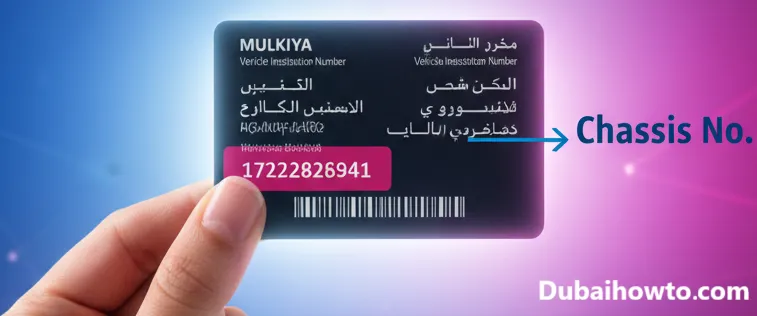
You can find the VIN on the car’s registration card (Mulkiya), on the dashboard (visible through the windshield), or on the sticker inside the driver’s side door frame.
Method 1: How to Perform an EVG Accident Check?
The Emirates Vehicle Gate (EVG) website is the primary federal tool for checking accident data for vehicles registered in most emirates.
This portal pulls data from Abu Dhabi, Sharjah, Ajman, Umm Al Quwain, Ras Al Khaimah, and Fujairah. Note that it typically does not include accident data from the Emirate of Dubai, which uses a separate system.
Step-by-step EVG inquiry
Here is the process for checking a vehicle’s history on the EVG portal.
Step 1: Access the Portal: Navigate to the official Emirates Vehicle Gate website.
Step 2: Create an Account: You must register for an account (or log in) to access the detailed vehicle services.
Step 3: Find the Service: Once logged in, look for the “Accident Inquiry” or a similarly named service under the vehicle services menu.
Step 4: Enter the VIN: Input the 17-digit chassis number (VIN) of the car you wish to check.
Step 5: Review the Report: The system will display any recorded accident history associated with that VIN, often including the date, location, and severity of the incident.
Method 2: Using the MOI Accident History Portal
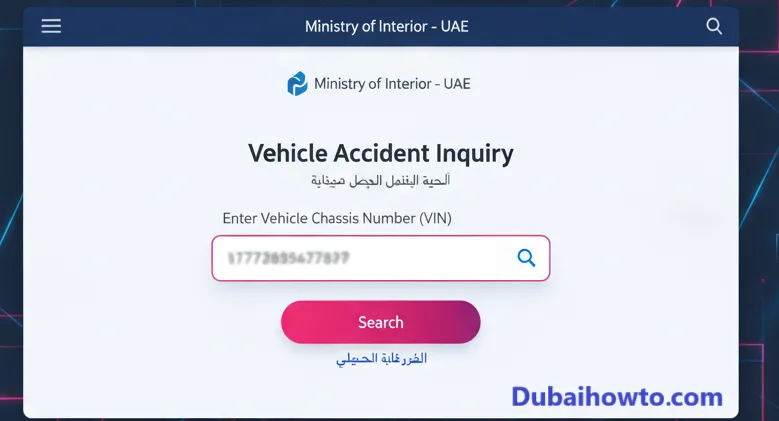
An alternative and often more direct way to check accident history is through the Ministry of Interior (MOI) website or their official app.
This service also covers the same emirates as the EVG (excluding Dubai) and provides a clear, official report. Many users find the moi accident check interface to be faster for this specific task.
Step-by-step MOI inquiry
The MOI process is known for being straightforward.
Step 1: Visit the MOI Website/App: Go to the official MOI UAE portal or download the “MOI UAE” mobile application.
Step 2: Navigate to Services: Select “E-Services” or “Traffic Services.”
Step 3: Locate the “Accident Inquiry”: Look for the service named “Inquiry for Vehicle Accidents” or “Accident Inquiry.”
Step 4: Enter the VIN: Type in the 17-digit chassis number (VIN) and any required verification code.
Step 5: Get the Results: The portal will immediately display a list of reported accidents for that vehicle, including the report number, date, time, and location.
Method 3: How to Check Accident History in Dubai (RTA)
Vehicle data for cars registered in Dubai is managed separately by the Roads and Transport Authority (RTA). The EVG and MOI portals will not show this information.
The RTA provides a “Vehicle Technical Status Certificate” service, which includes accident history, ownership history, and insurance details.
How the RTA check works?
This process is different as it requires coordination with the seller and a small fee (typically around 120 AED as of 2026).
Step 1: Visit the RTA Website: Navigate to the RTA’s official website and find the “Driver and Vehicle Owner Services.”
Step 2: Select the Service: Look for the “Vehicle Accident Enquiry” or “Technical Vehicle Status Certificate” service.
Step 3: Enter the VIN: The buyer or seller inputs the chassis number.
Step 4: Seller Verification: The RTA will send a one-time password (OTP) via SMS to the current registered owner’s mobile number. The owner must share this code with you to proceed.
Step 5: Pay the Fee: Once the code is entered, you must pay the service fee online (approx. 120 AED).
Step 6: Receive the Certificate: The RTA will generate a comprehensive PDF certificate detailing the vehicle’s condition and history.
Method 4: Using the Abu Dhabi Police Portal
For vehicles with a history in Abu Dhabi, the Abu Dhabi Police website offers another direct portal for inquiries. This is particularly useful for cross-referencing data or if you are specifically dealing with a car from the capital.
Accessing the AD Police system
Step 1: Go to the Portal: Visit the Abu Dhabi Police website.
Step 2: Find Public Services: Navigate to “Public Services” or “Traffic Services.”
Step 3: Select the Inquiry: Choose the “Vehicles’ Accidents Inquiry” service.
Step 4: Enter VIN: Input the chassis number and submit to view the evg accident report.
Quick Comparison: UAE Accident Check Portals (2026)
| Portal | Primary Emirate(s) Covered | Typical Cost (AED) | Requires Owner’s Help? |
| EVG (Emirates Vehicle Gate) | All except Dubai | Free | No |
| MOI (Ministry of Interior) | All except Dubai | Free | No |
| RTA (Roads and Transport) | Dubai Only | ~120 AED | Yes (for SMS OTP) |
| Abu Dhabi Police | Abu Dhabi (cross-references others) | Free | No |
Understanding Your UAE Accident Report
Once you run an evg accident check or moi accident check, you will receive a report. It’s important to know how to read it.
What the report tells you
- Accident Report Number: A unique ID for the incident.
- Date and Time: When the accident occurred (DD/MM/YYYY).
- Location: The emirate and specific area of the incident.
- Severity (if available): Some reports may classify the damage as minor, moderate, or major.
- No Data Found: If the report comes back clean, it means no accidents were reported to the police in the covered emirates.
Limitations to remember
A clean report is a good sign, but always supplement it with a physical inspection. These reports will not show:
- Accidents from outside the UAE (unless it’s a specific GCC-imported report).
- Minor damage that was repaired privately without a police report.
- Normal wear and tear or mechanical issues.
Pro Tip: VIN Check vs. Physical Inspection
Never rely only on the digital
evg accident history. A clean report means no reported accidents. Always commission a professional pre-purchase inspection (PPI). An expert mechanic can spot signs of undocumented repairs, flood damage, or frame issues that no online report will ever show.
Final Thoughts
Performing an evg accident check or moi accident check is a non-negotiable step before buying a used car in the UAE.
Using the free portals from Emirates Vehicle Gate and the Ministry of Interior provides instant peace of mind for cars from six emirates. For Dubai-registered cars, the RTA’s paid certificate is the official standard.
These tools, combined with a professional physical inspection, empower you to make an informed, safe, and financially sound investment.
Frequently Asked Questions (FAQs)
1. How can I check a car’s accident history in the UAE for free?
You can check a car’s accident history for free using the Ministry of Interior (MOI) website or the Emirates Vehicle Gate (EVG) portal. Both services require the 17-digit VIN (chassis number) and cover vehicles registered in Abu Dhabi, Sharjah, Ajman, RAK, Fujairah, and UAQ.
2. Does the EVG accident check show Dubai accidents?
No. The EVG and MOI portals generally do not include accident data for vehicles currently registered in Dubai. For Dubai-registered cars, you must use the RTA’s “Vehicle Technical Status Certificate” service, which costs approximately 120 AED and requires the owner’s cooperation for an SMS code.
3. What is the difference between an EVG check and an MOI check?
Both the EVG (Emirates Vehicle Gate) and MOI (Ministry of Interior) are federal portals that pull from similar databases. They both provide free accident inquiry services for all emirates except Dubai. The user interface is slightly different, but the data provided is generally the same.
4. What if a car’s chassis number (VIN) shows no accidents?
A clean report means no accidents were officially reported to the police for that vehicle in the covered emirates. It is still highly recommended to get a physical pre-purchase inspection (PPI) from a trusted garage, as they can spot minor, unreported repairs or potential mechanical issues.
Last updated: October 2026
Reviewed by: Adnan Khan, Automotive Data Specialist
Disclaimer: This guide is for informational purposes. Fees, processes, and portal functionalities are subject to change by official government entities. Always verify on the respective portals.

Author: The DubaiHowto Editorial Team
DubaiHowto is an independent informational platform created to help UAE residents and visitors understand everyday services such as public transport, telecom, government procedures, visas, fines, and utility systems.
Our editorial team researches and verifies content using official UAE sources (including government portals, service providers, and regulatory authorities) and real on-ground experience of living in the UAE. Each guide is written to be practical, easy to understand, and regularly updated to reflect the latest rules, fees, and procedures.
We focus on clarity, accuracy, and usefulness — especially for people navigating UAE systems for the first time. Learn More about DubaiHowto.
Last reviewed: February 2026. Sources: Official UAE portals and service providers