
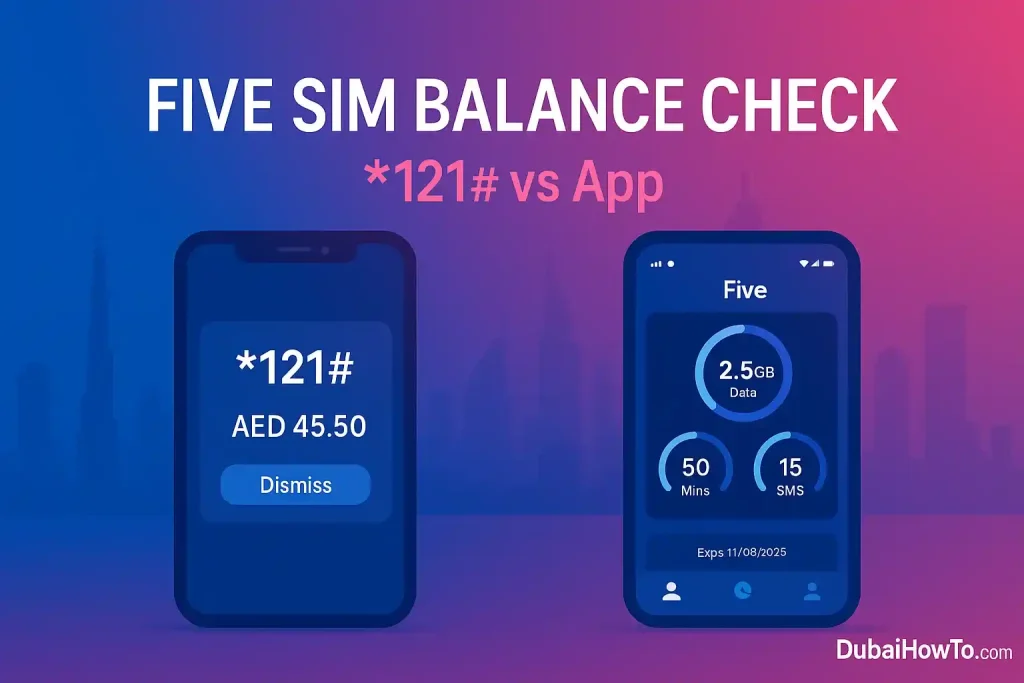
Need your Five SIM balance fast? Dial *121# for an instant pop-up with your main credit and validity. Prefer an app view? Open the Five App to see remaining data, minutes, and expiry. For data-only allowances, use *135# or check Usage inside the app.
Do this next — Five SIM balance check
- Dial
*121#→ read main & bonus balance. - Open Five App → Home ▸ Usage to see data/minutes.
- If needed, dial
*135#→ My Data to view/activate data packs.
Methods to check your balance (step-wise)
Method 1 — USSD (fastest)
Step 1: Open your phone dialer.
Step 2: Enter *121# and press call.
Step 3: Review the on-screen message: it shows your main account balance (AED) and remaining validity.
Why choose this: works on any handset, no data required, updates instantly.
Method 2 — Five App (full usage view)
Step 1: Launch the Five App and sign in with your Five number.
Step 2: On Home, check Usage for data, minutes, SMS and pack expiry.
Step 3: Tap Recharge to top up, or Buy packs to add data/IDD minutes.
Why choose this: clear breakdowns, history, and add-ons in one place.
Method 3 — Data-only balance via USSD
Step 1: Dial *135#.
Step 2: Choose My Data (or Data packs) to view or manage allowances.
Step 3: Activate an add-on if you’re running low.
Why choose this: quick path for data allowances when you can’t open the app.
Understand what you’re seeing
Main vs. bonus credit
Main balance is your spendable AED credit. Bonus credit (often offered on top-ups) is added to your main account on Five and used at standard rates. You may see both reflected after a recharge; use either for calls, SMS, or data bundles as per current offer terms.
Validity and inactivity rules
Five prepaid lines have lifetime validity so long as you use the line at least once every 3 months (a call/SMS/data session counts). If inactive for 3 months, the line may suspend and balance can be forfeited; you typically have 30 days to recharge/restore before permanent cease.
Data usage vs. wallet credit
Wallet credit (AED) is different from data allowances (MB/GB). If a page shows healthy AED balance but data won’t work, you likely need a data pack (buy in app or *135#). If mobile data is on but usage stalls, check APN settings and signal.
Quick reference (cards)
Balance methods (UAE — Five SIM)
- USSD balance:
*121# - Data menu:
*135# - App path: Five App ▸ Usage ▸ details
- Recharge IVR (voucher): call
120then enter e-voucher PIN (announces new balance after top-up) - Customer care: 800544 (helpline)
What you need ready
- Active Five SIM (signal bars visible)
- Unblocked USSD (some corporate profiles block it)
- Any handset; data/Wi-Fi only needed if using the app
All FIVE SIM codes in one place
| What you need | Code or number |
| Main balance and validity | *121# |
| Data and minutes left | *135# |
| Current offers and promotions | *101# |
| Deal of the Day | *050# |
| Camp Data pack | *135*199# |
| Cheap international calls (from 10 fils a minute) | *135*125# |
| Recharge with an e& voucher | Call 120 |
| Customer care | 800 544 |
FIVE data packs and prices
If your balance is fine but data has stopped, you probably need a pack. These are the packs listed on FIVE’s official site:
| Pack | Price | What you get | Validity |
| 1-hour unlimited | AED 2 | Unlimited data | 1 hour |
| 24-hour unlimited | AED 10 | Unlimited data | 24 hours |
| Daily | AED 3 | 150MB at 200 kbps | 24 hours |
| 28-day | AED 33 | 150MB a day | 28 days |
| 30GB | AED 45 | 1GB a day | 30 days |
| Camp Data | AED 60 (VAT incl.) | Nonstop data at 3 Mbps inside labour camps + 1GB full speed outside | 30 days |
Subscribe to Camp Data with *135*199#; for the other packs, use the Five App or check *101#. For more options, see our guide to FIVE SIM data offers.
Get more credit with the FIVE recharge bonus
FIVE adds a 30% bonus when you recharge AED 50 or more, and 20% on recharges of AED 15 to AED 49. Recharges below AED 15 get no bonus, so one AED 50 top-up gives you more credit than several small ones.
Troubleshooting & edge cases
USSD shows error or times out
Check signal (try an outdoor spot), then toggle airplane mode for 10 seconds. If still failing, restart and try again. USSD can fail while roaming—use the Five App on Wi-Fi to view usage.
Balance dropped unexpectedly
Background data or auto-renew add-ons might be consuming credit. In the Five App, open My plans to see what renewed. Consider disabling auto-renew or switching to a bundle that fits your weekly usage.
SIM suspended after inactivity
If you haven’t used the line in 3 months, do a quick outgoing call or small recharge to reactivate. If suspended, top up immediately—there’s usually a 30-day grace before cease.
Data works but usage doesn’t update
Allow a few minutes for counters to refresh. In the app, pull to refresh Usage. USSD *135# can also reflect active data bundles if the app cache is stale.
Pro Tip:
If you just recharged with an e-voucher, stay on the line after calling 120—the IVR often confirms your new balance. Then dial*121#once more for the latest on-screen figure.
Final thoughts
For most users, *121# is the fastest Five SIM balance check. Keep the Five App installed for a clearer view of data/minutes and expiries, and use *135# when you specifically want to manage data allowances. Set a monthly reminder to review usage and switch to the best-fit bundle before auto-renew.
FAQs on Five sim balance check
1) What is the Five SIM balance check code?
Dial *121# from your Five line. You’ll get an instant pop-up with your main balance in AED and validity. It works on basic phones and doesn’t need mobile data.
2) How do I check Five SIM data balance?
Dial *135# from your FIVE line to see the data and minutes you have left, or open the Five App and check Usage.
3) Will I be charged for using *121#?
FIVE’s website does not list a fee for *121#. If you want to be sure a balance check costs nothing, use the Five App, which shows your balance and usage at any time.
4) My line shows 0 balance after recharge—why?
Wait 1–2 minutes and redial *121#. If you recharged by calling 120, the IVR should also announce your updated balance. If nothing changes, check the voucher PIN and try again or contact support.
5) What happens if I don’t use my Five SIM for months?
Five offers lifetime validity if you use the line at least once every 3 months. After prolonged inactivity, the line may suspend and balance can be lost; recharge promptly to restore before the cease window closes.
6) What is the Five SIM offer check code?
Dial *101# to see current offers and promotions, and *050# for the Deal of the Day. The Five App also lists every pack you can buy.
7) How do I get Camp Data on Five SIM?
Dial *135*199#. Camp Data costs AED 60 (VAT included) for 30 days and gives nonstop data at 3 Mbps inside labour camps plus 1GB of full-speed data outside.
8) Does Five SIM have a 24-hour unlimited data pack?
Yes. FIVE lists a 24-hour unlimited pack for AED 10 and a 1-hour unlimited pack for AED 2. Buy them in the Five App or check *101#.
9) What is the Five SIM code for cheap international calls?
Dial *135*125# to subscribe to FIVE’s low-rate calling offer, which brings calls to India, Pakistan, Bangladesh, Afghanistan and Nepal down to as little as 10 fils a minute.
Last updated: October 2026 • Reviewed by: Telecom Editor (UAE prepaid specialist)
Disclaimer: Fees, offers, and codes can change. Not legal/financial advice.
More guides you may need

Author: The DubaiHowto Editorial Team
DubaiHowto is an independent informational platform created to help UAE residents and visitors understand everyday services such as public transport, telecom, government procedures, visas, fines, and utility systems.
Our editorial team researches and verifies content using official UAE sources (including government portals, service providers, and regulatory authorities) and real on-ground experience of living in the UAE. Each guide is written to be practical, easy to understand, and regularly updated to reflect the latest rules, fees, and procedures.
We focus on clarity, accuracy, and usefulness — especially for people navigating UAE systems for the first time. Learn More about DubaiHowto.
Last reviewed: February 2026. Sources: Official UAE portals and service providers